ADVERTISEMINTĀ®

Digital Advertising Agency

  • Services
    • Facebook Advertising Agency
    • Advertising Agency for Amazon
    • TikTok Advertising Agency
    • Google Ads Advertising Agency
    • Instagram Advertising Agency
    • Snapchat Advertising Agency
    • LinkedIn Advertising Agency
    • Spotify Advertising Agency
    • Pinterest Advertising Agency
    • YouTube Advertising Agency
  • Locations
  • Pricing
  • Blog
  • Contact
  • 844-236-4686
  • Get Started
Home / Facebook / How To Install Pixel Perfect to Shopify

September 29, 2016

How To Install Pixel Perfect to Shopify

Pixel Perfect is an app on Shopify that allows you to install pixels and product feeds on your Shopify store—no coding required! To be able to install this app, you must fulfill these three requirements:

  1. You must have a Facebook Pixel ID
  2. Your store must not have any existing Facebook Pixels installed
  3. You must not have any existing Facebook tracking code installed in the ā€œadditional scripts to run after checkoutā€ section of your store.

If you want to learn how to install Pixel Perfect to Shopify, follow the steps listed below.

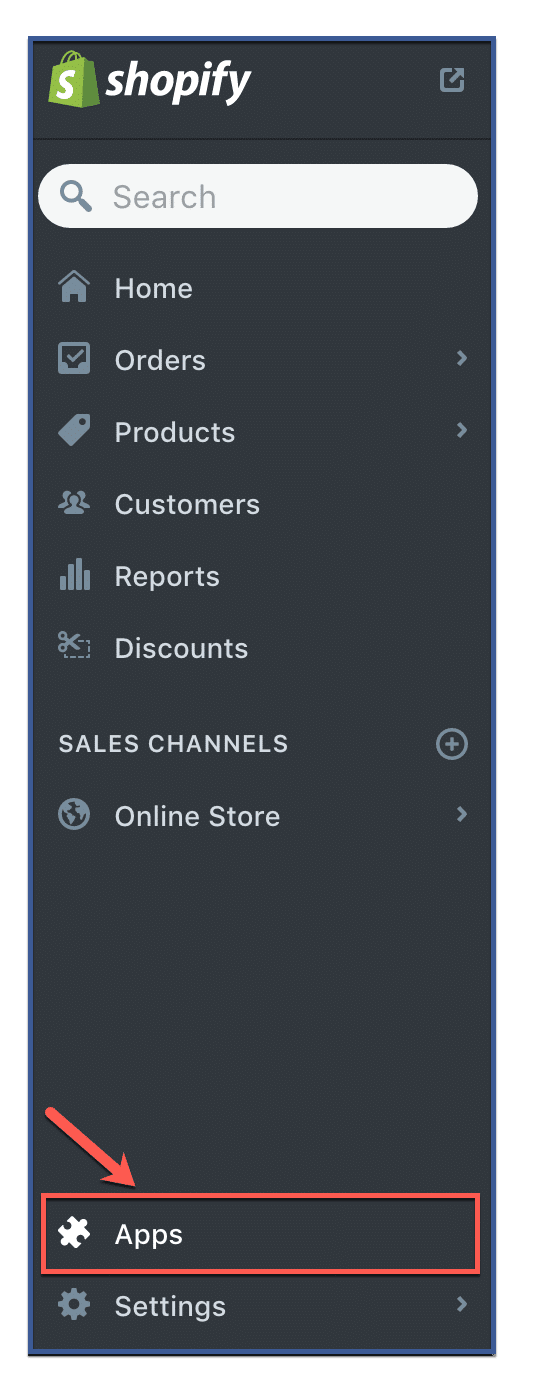
Step 1: Click ā€œAppsā€

Once logged in to Shopify, click ā€œApps,ā€ a tab located on the bottom part of the left hand column.
how-to-install-pixel-perfect-to-shopify1

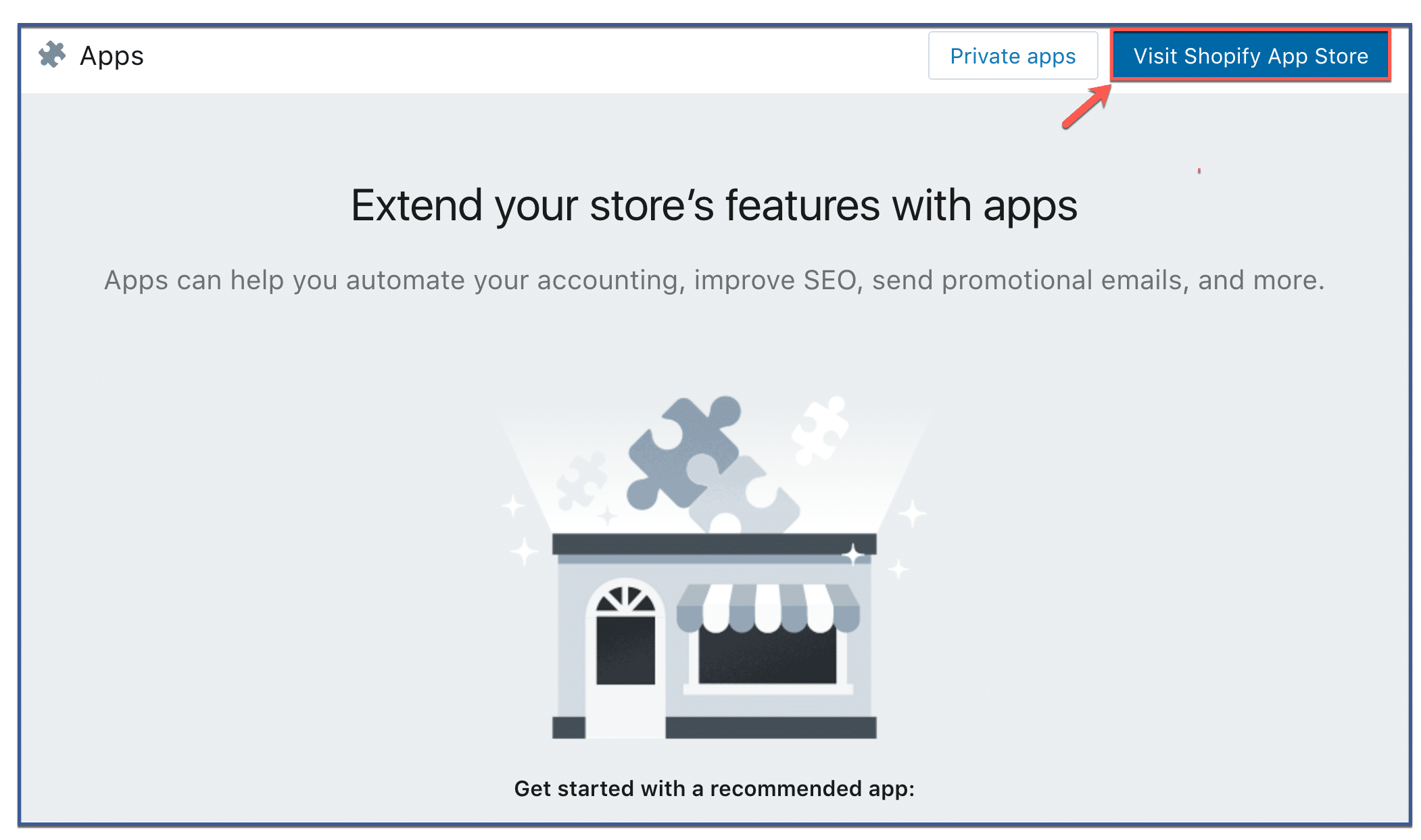
Step 2: Visit Shopify App Store

Click ā€œVisit Shopify App Store.ā€

how-to-install-pixel-perfect-to-shopify2

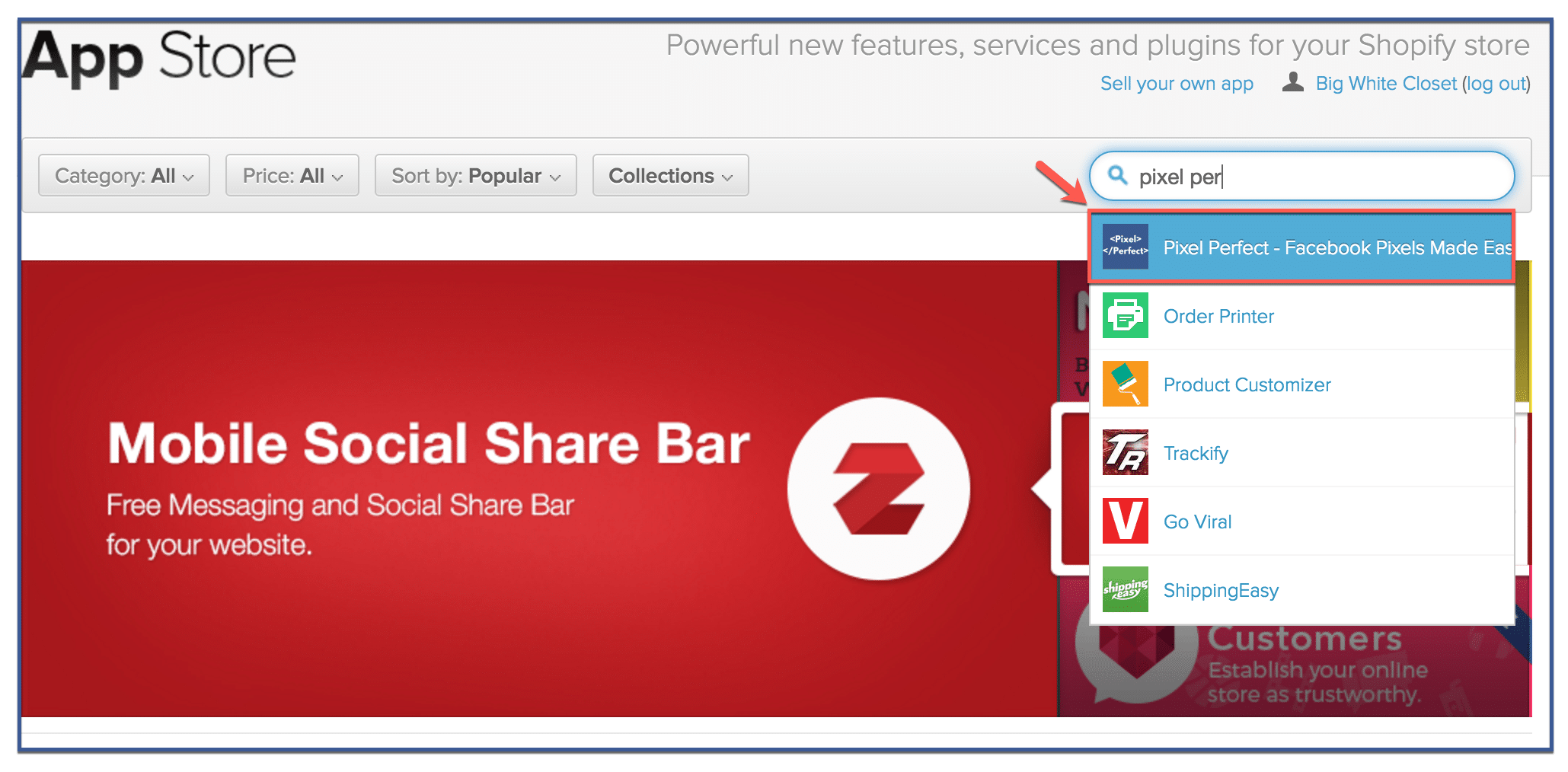
Step 3: Search for Pixel Perfect

Type in Pixel Perfect on the search engine then click ā€œPixel Perfect.ā€

how-to-install-pixel-perfect-to-shopify3

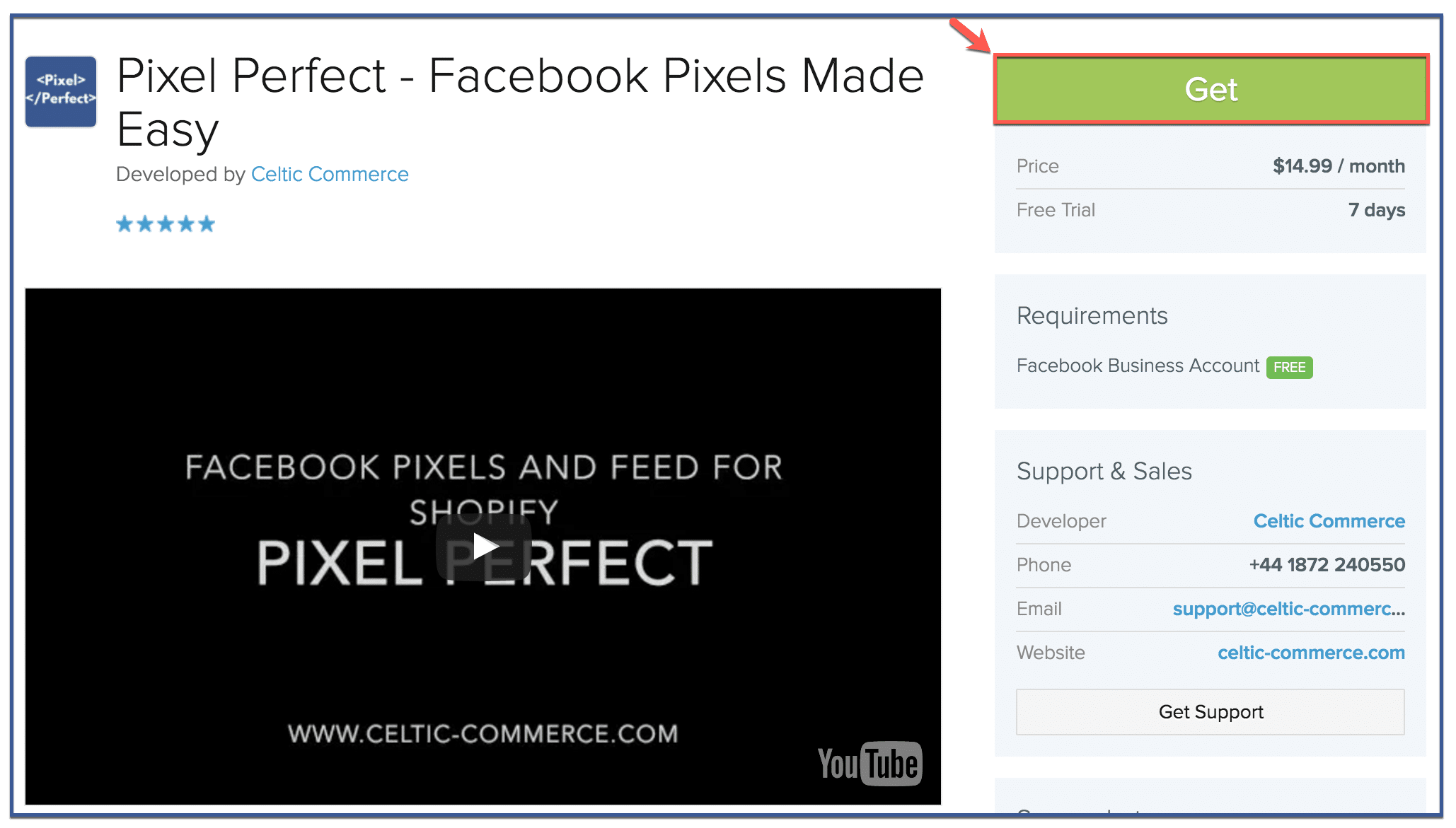
Step 4: Click ā€œGetā€

Click ā€œGet.ā€ Note that you will get a 7-day free trial. After 7 days, your card will be charged $14 dollars each month.
how-to-install-pixel-perfect-to-shopify4

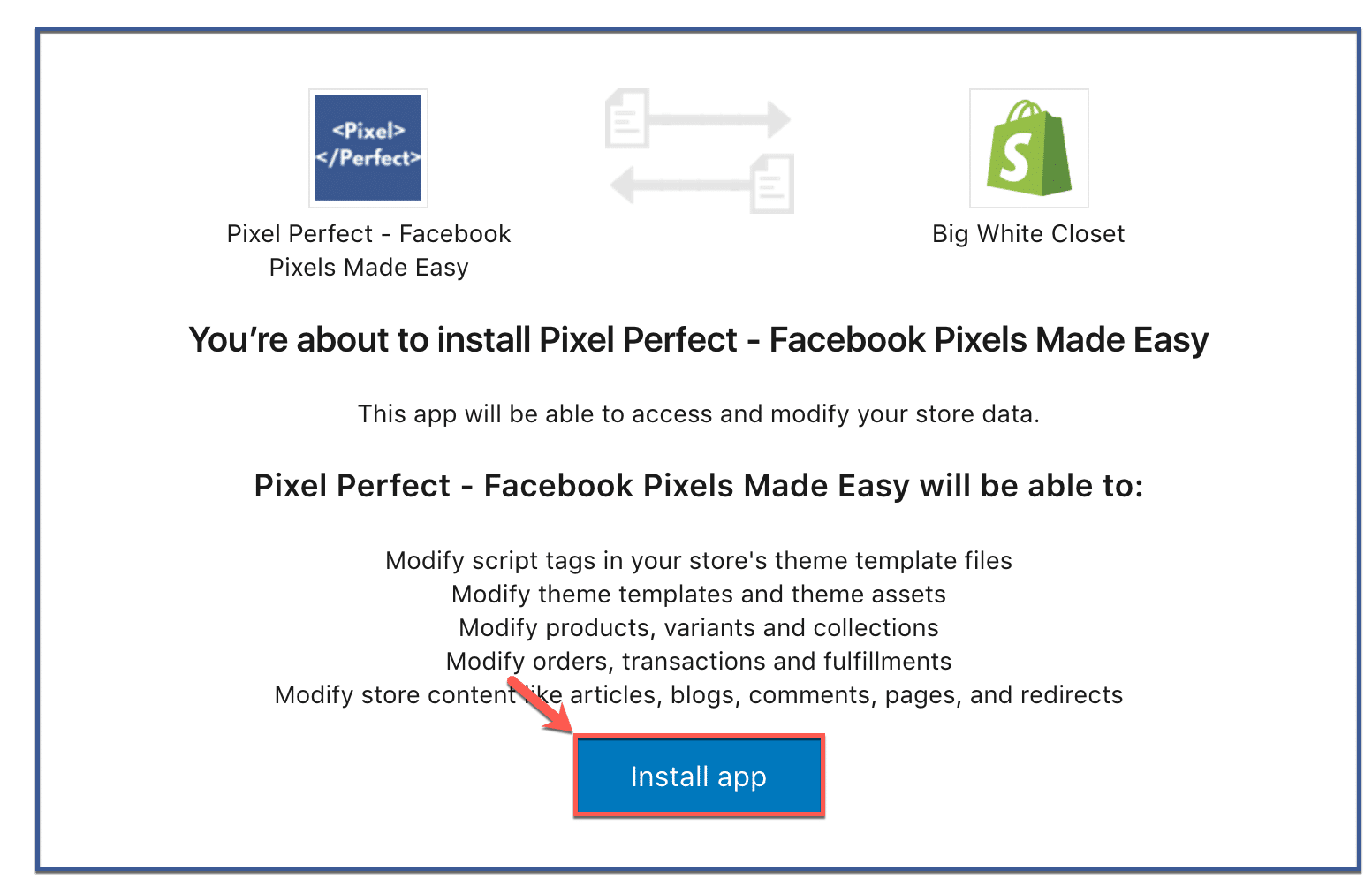
Step 5: Click ā€œInstall Appā€

Click ā€œInstall App.ā€

how-to-install-pixel-perfect-to-shopify5

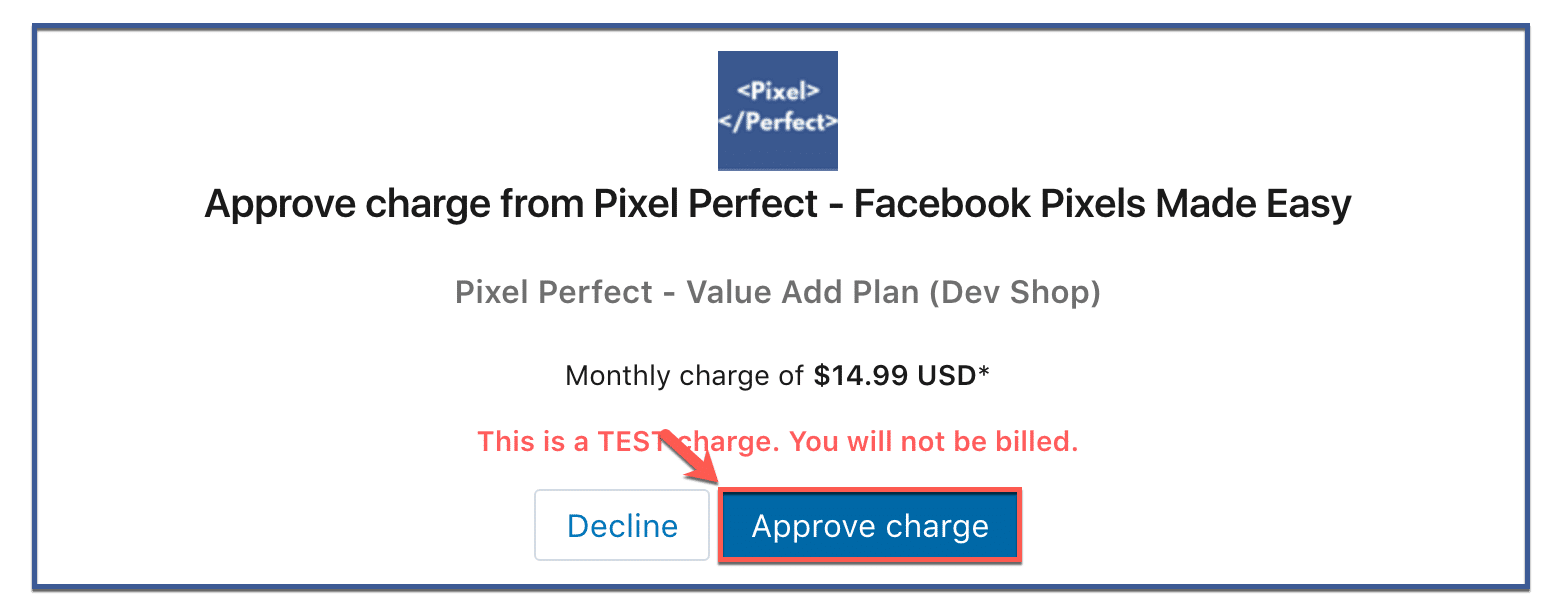
Step 6: Click ā€œApprove Chargeā€

Click ā€œApprove Charge.ā€ Note that this is only a test charge. You will not be billed for your purchase.
how-to-install-pixel-perfect-to-shopify6

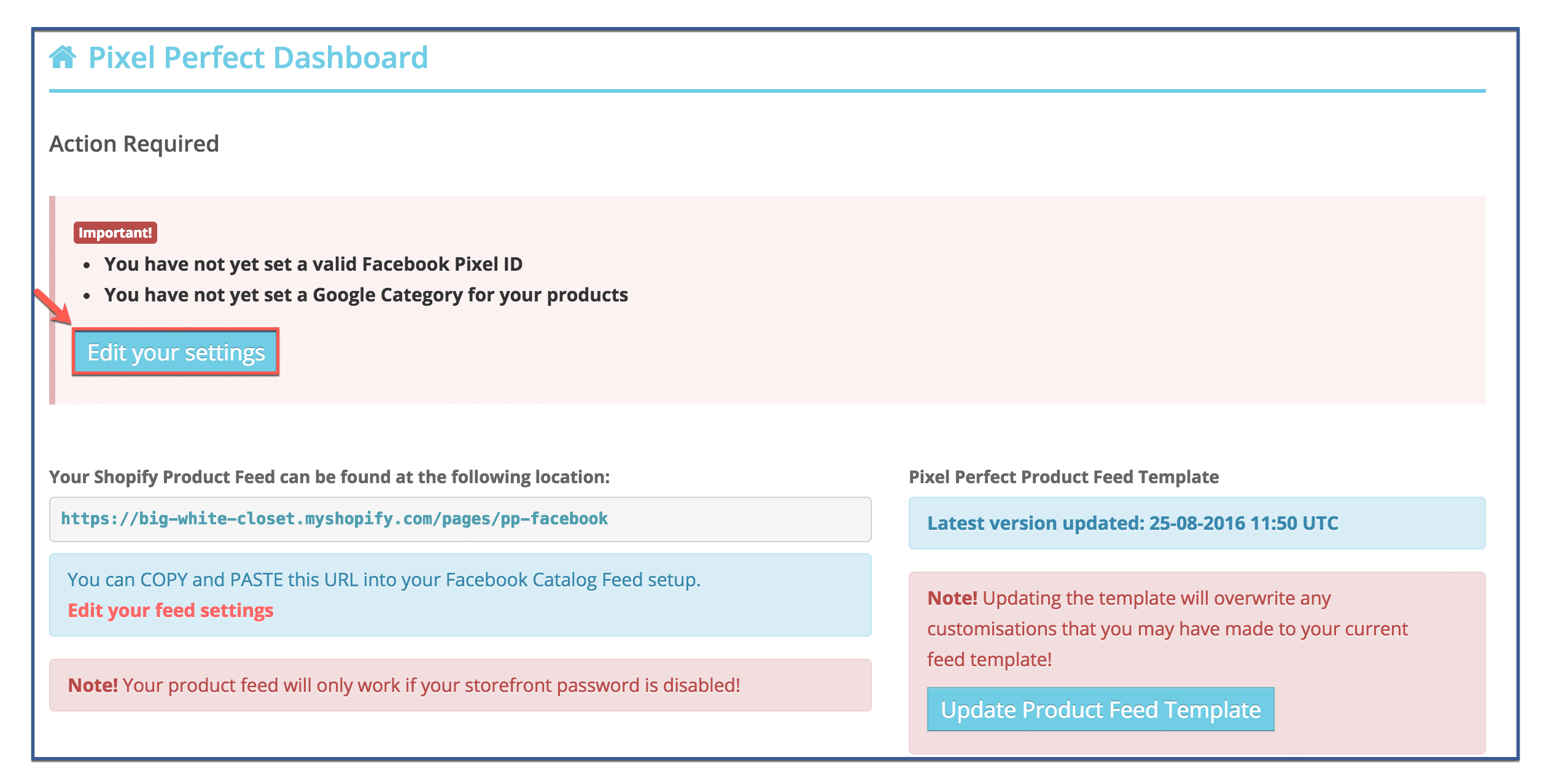
Step 7: Edit your settings

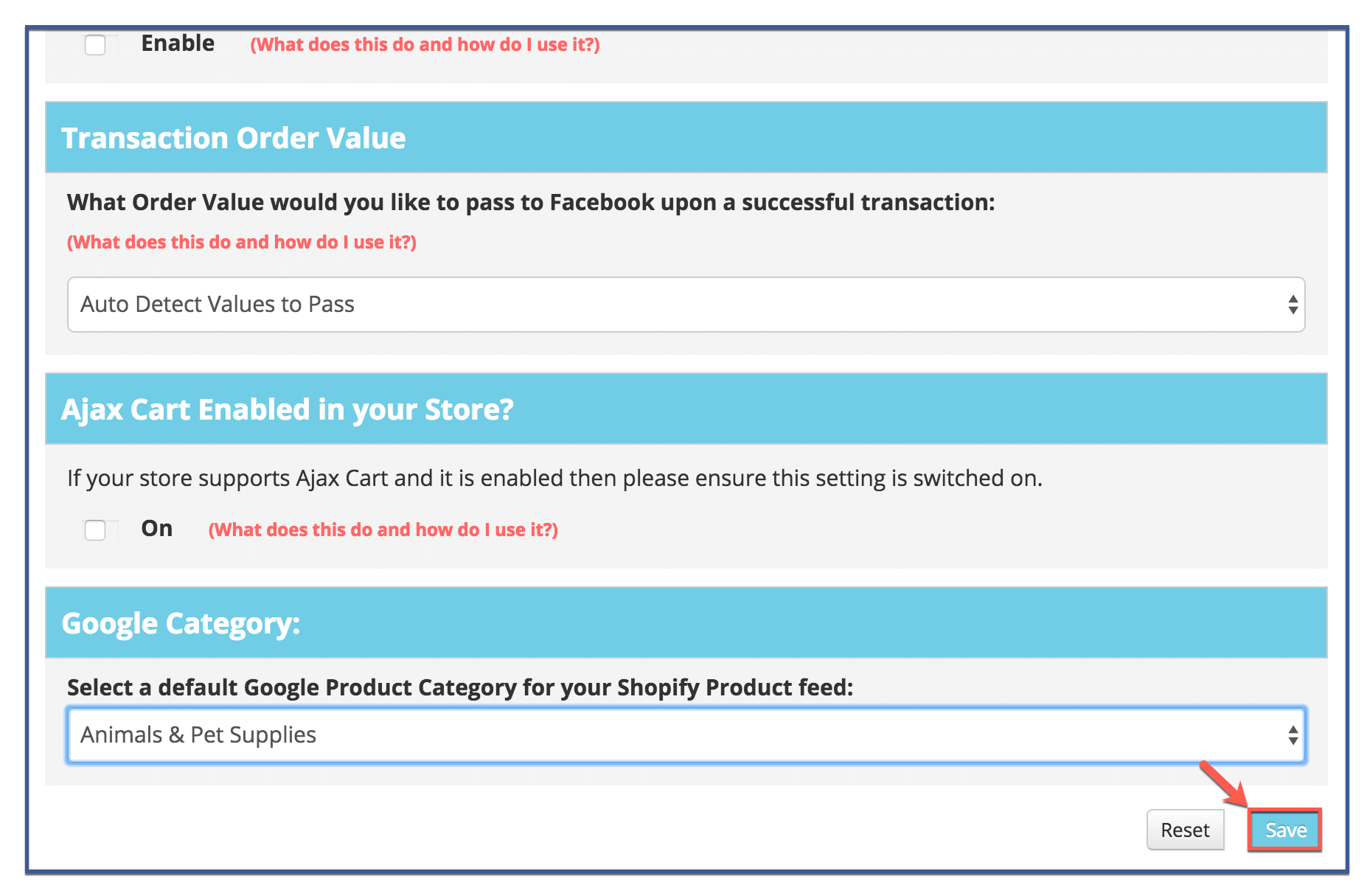
Click ā€œEdit Settingsā€ to add your Facebook Pixel ID to pixel perfect, as well as assign a category for your products. This step is required.
how-to-install-pixel-perfect-to-shopify7

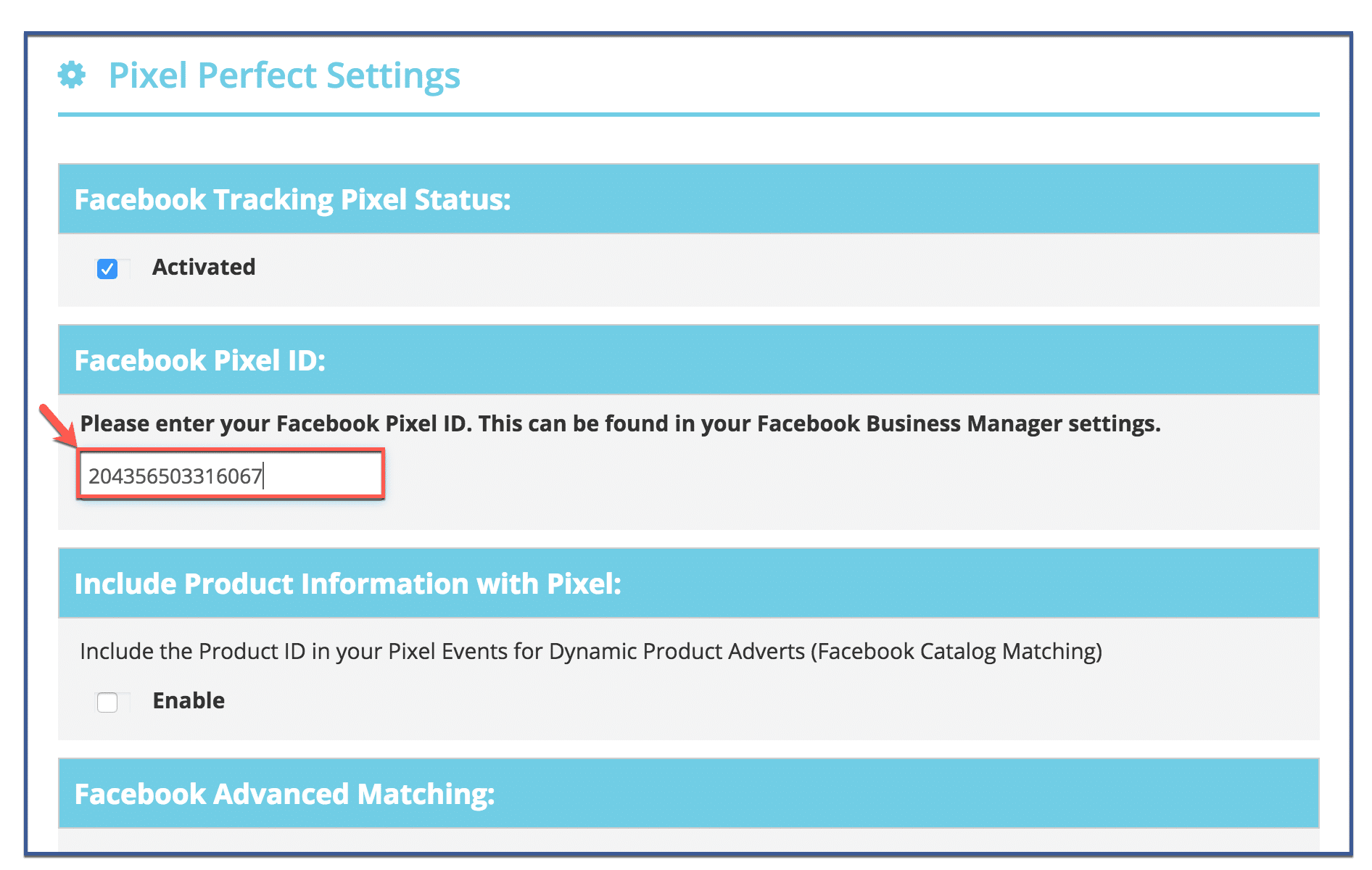
Step 8: Paste your Facebook Pixel ID

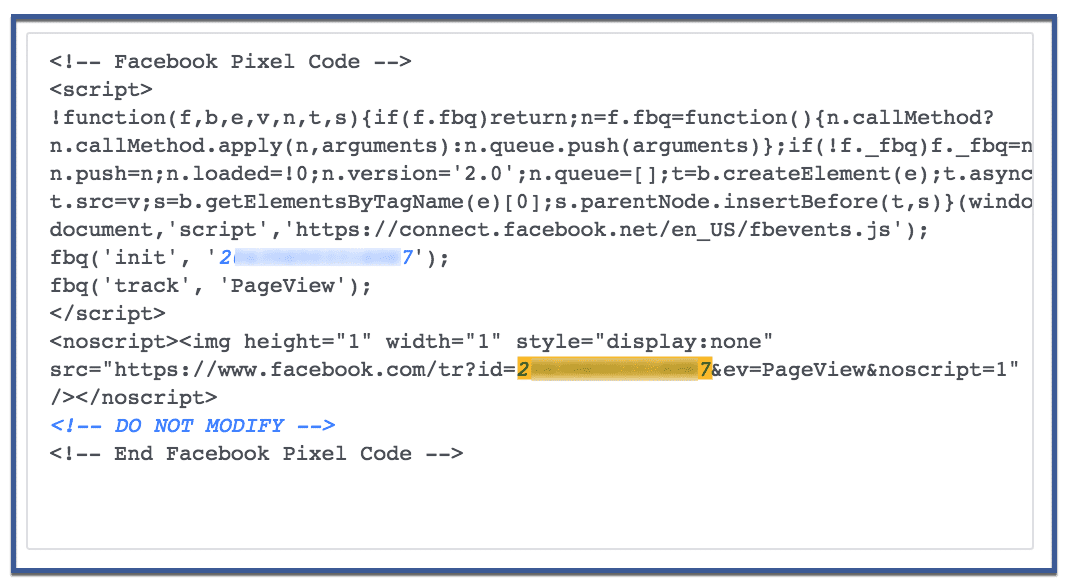
Scroll down the page until you find the section that says ā€œFacebook Pixel ID.ā€ Afterward, paste in your Facebook Pixel ID. If you don’t know how to find your Facebook Pixel or if you want to learn how to create a Facebook Pixel visit How To CreateĀ aĀ Facebook Pixel.

Your Pixel ID is the number highlighted below.
how-to-install-the-facebook-pixel-to-shopify2

Step 9: Choose Google category

Scroll to the bottom until you hit the section called ā€œGoogle Category.ā€ Choose a category that describes your product. Afterward, hit ā€œSave.ā€

how-to-install-pixel-perfect-to-shopify9

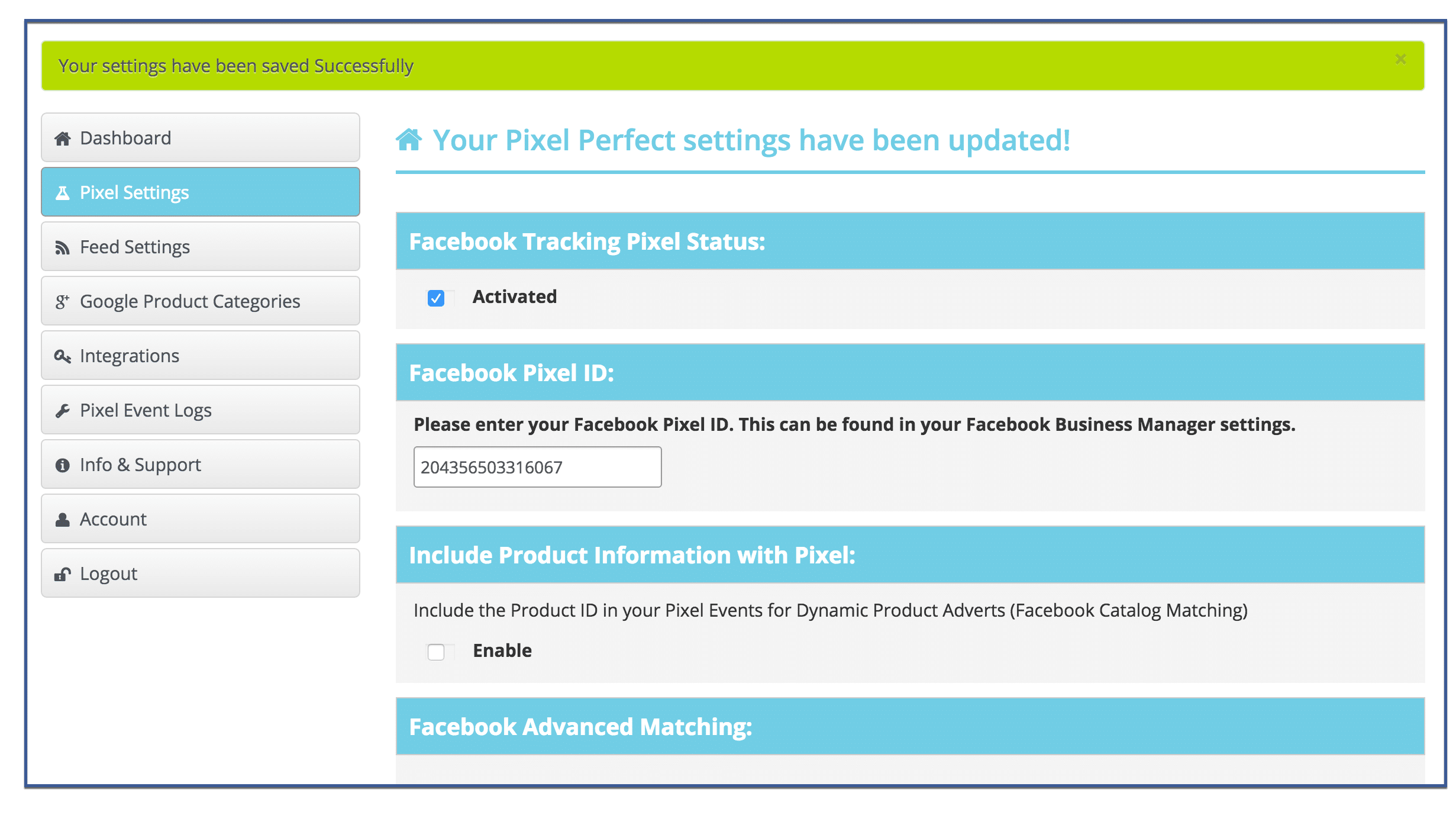
Step 10: You’re done!

Your Facebook Pixel and category should be saved. There are no further steps required of you.
how-to-install-pixel-perfect-to-shopify10

Go to top

Did you find this article helpful and informative? If so, comment, like, or share!

Request a FREE 30 Minute Strategy Call
Discover the best ad platforms to grow your business.


Profitable Ads

About Anne Felicitas

Anne Felicitas is the editor for the AdvertiseMint Advertising Blog and writes on Paid Social Advertising which features Facebook Ads, Instagram Ads, TikTok Ads, Snapchat Ads and YouTube Ads. Anne also oversees the team of writers and contributors, ensuring that AdvertiseMint produces short form, long form and infographics related to businesses looking to hire an advertising agency.

Complete Guide to Facebook Targeting

Facebook Ad Targeting

Download our FREE Facebook guide with over 850 ad targeting options.

  • This field is for validation purposes and should be left unchanged.

Ad Targeting Infographics

  • Amazon DSP Ad Targeting
  • Facebook Ad TargetingĀ 
  • Hidden Facebook Ad Targeting
  • LinkedIn Ad Targeting
  • Snapchat Ad Targeting
  • Digital Ad Platform Policies

Hear the Audiobook FREE on Audible

Browse by Platform

  • Facebook
  • TikTok
  • Instagram
  • Twitter
  • YouTube
  • LinkedIn
  • Snapchat
  • Pinterest
  • Amazon
  • Google

AdvertiseMint

  • Home
  • About
  • Careers
  • Advertising Blog
  • Locations
  • Industries
  • FAQ

Follow Us

Facebook
Instagram
Snapchat
Youtube
Linkedin
Twitter

Services

Facebook Advertising
Instagram Advertising
Google Advertising
Amazon Advertising
Pinterest Advertising
Tiktok Advertising

NEWSLETTER

Get expert insights and latest news in digital advertising every week

NEWSLETTER

333 S Garland Ave 13th Floor, Orlando, FL 32801       |       844-236-4686

Terms and Conditions | Privacy Policy | Earnings Disclosure | Cookie Policy

advertisemint google partner

Ā© 2026 AdvertiseMint All Rights Reserved.